
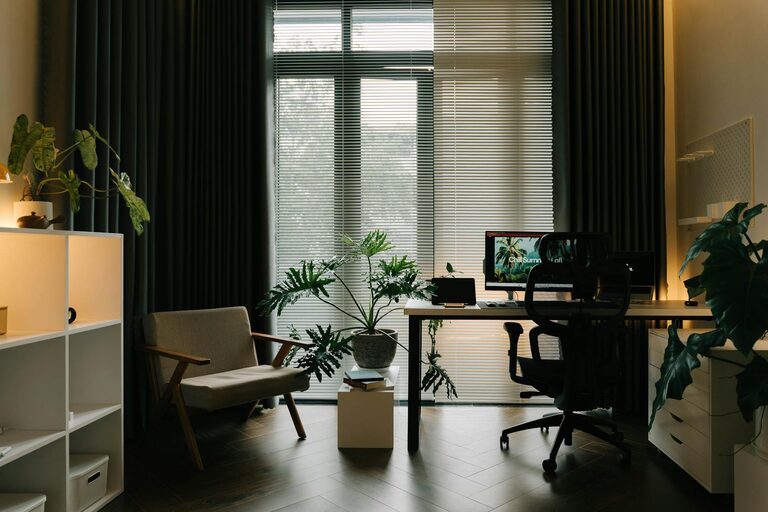
Creating a cozy and functional home workspace is essential for anyone working or studying from home. A well-designed area can boost your productivity, reduce stress, and improve your overall work experience. Whether you have a dedicated room or just a small corner, with the right approach, you can make your workspace inviting and efficient. Below are practical tips and ideas to help you create a home office setup that works for you.
Choose the Right Location
Before setting up your workspace, select a spot that fits your needs:
– Natural Light: If possible, pick a space near a window to take advantage of natural light. It helps reduce eye strain and improves mood.
– Low Traffic Area: Choose an area away from distractions like the TV or busy household zones.
– Space Availability: Make sure there’s enough room for your desk, chair, and storage without your area feeling cramped.
Invest in Comfortable Furniture
Your furniture choice can make a big difference in comfort and productivity.
Select an Ergonomic Chair
An ergonomic chair supports your posture and reduces discomfort during long hours of sitting. Look for:
– Adjustable height and armrests
– Lumbar support
– Breathable materials
Choose the Right Desk
Depending on your space and needs, pick a desk that fits comfortably. Consider:
– Desk size suitable for your computer, accessories, and workspace
– Adjustable desks or sit-stand options for better health
– Clean and simple surfaces to reduce clutter
Organize with Smart Storage Solutions
Keeping your workspace organized leads to better focus.
– Use shelves or filing cabinets to store papers and supplies
– Desk organizers for pens, notebooks, and small items
– Cable management to keep cords tidy and out of sight
Personalize Your Space
Add cozy touches to make your workspace inviting and uniquely yours.
– Houseplants to improve air quality and add life
– Soft lighting such as a desk lamp or string lights to create warmth
– Personal photos or artwork for inspiration
Optimize Lighting
Good lighting reduces eye strain and helps maintain alertness.
– Combine natural light with layered lighting: ambient, task, and accent
– Use adjustable desk lamps for focused work areas
– Avoid harsh overhead light that may cause glare
Minimize Distractions
A calm environment helps you concentrate.
– Noise-cancelling headphones or soft background music can help drown out noise
– Set clear boundaries with household members during work hours
– Keep your workspace reserved solely for work to build focus associations
Prioritize Technology Setup
Make sure your technical equipment supports your work efficiently.
– High-speed internet to reduce interruptions
– Quality computer hardware suited for your tasks
– Accessories such as an external keyboard, mouse, or monitor for comfort
Maintain a Clean and Clutter-Free Environment
A tidy workspace promotes clarity and productivity.
– Schedule a regular cleaning routine
– Remove items not related to work from your desk
– Use minimal décor to avoid overwhelming the space
Encourage Movement and Breaks
Incorporate habits that promote well-being.
– Use a standing desk or take standing breaks
– Set reminders to stretch or take short walks
– Keep water nearby to stay hydrated
Final Thoughts
Designing a cozy and functional home workspace doesn’t have to be complicated. By choosing the right location, investing in comfortable furniture, organizing efficiently, and adding personal touches, you create an environment where productivity and comfort go hand in hand. Remember to consider lighting, minimize distractions, and maintain a clean space to make your home office a place you enjoy spending time in every day. With a thoughtful setup, you’ll find working from home easier and more enjoyable.